Friday 8:30 AM
Public Workstation Sanity: Approaches to Managing Time and Patrons at Public Workstations
Panel: Jim Keenan, Bernadette, Ira
There will be a link to many resources posted on the Billerica Library Website on Monday (including contact information for panel members)!
Jim began by providing us with an overview of the issues and public workstation environment. He also mentioned that the panel is not advocating for any particular solution, but presenting a variety of solutions that may or may not work for your institution. Each community/institution has different needs.
3 Management Areas: Time, Print & Computer
Who can use the public workstations? How long can they use them? How can the library exert control during patron sessions.
Time Management Solutions: PC Reservation (Envisionware), Pharos, Patron Access Management Xerox, CASSIE, Librarica, CybraryN, Time Limit Mngr. (Open Source).
Print Management Solutions: Managing printers, print jobs, payment. Additional printing issues include coin machines and contract services.
Computer Management Solutions: Who can do what with the machines and when (can they download clients, change computer settings, etc...)? Different settings for patrons, administrators, automatic system processes.
CM Solutions - Products: SteadyState, Microsoft; DeepFreeze; Clean Slate, Fortres; Windows Policy Editor; CompuGard, Centurion; Fortres 101, Fortres; Trust-No-Exe, Beyond Logic; Userful.
Issues Mentioned:
How do we protect our computers and users (IE will save usernames/passwords for the remainder of the day when set to remember them for 0 days - Firefox has a setting that will not remember them)?
Integrating your systems: Getting everything to play nice (can't update anti-virus software at night if computers shut down). New version of Office (07) with file formats that are not backward compatible, and there are some combinations of software that do not work together (Roxio and DeepFreeze).
Pros & Cons of Open Source: It's free, tech expertise requirements, potential lack of support, possible additional system requirements (Linux instead of MS Windows).
Issues in Software Deployment: Do I have the expertise to install myself or will I need to pay for technical expertise? How much dedicated staff time? Consultants needed? Are there extra initial costs for setup?
Ira began by discussing... her experience and the evolution of computer management.
Her library took the technical experience of the library staff into account when selecting a CM Solution. Decided upon Userful and went from 5 computers in the library to 15 computers in the Reference and YA areas alone!
The Time Management has been great. They are using thin clients (5 PCs to a server), and the Linux operating system (required for Userful) and Open Office software are used on the computers.
Use notification of print costs to patrons to decrease the amount of lost fees (not using a Print Management system yet). Send messages to patrons when necessary (can send a message to teens that are being loud during busy times). Login to a webpage in the morning to manage the computers (it will show you if a computer has been dropped from the network and needs attention, usually caused by a loose cable or a similarly simple problem).
The library is allowing users to have an hour on the computers (staff can add time/decrease time as necessary). They use guest passes for people that are visiting (change the numbers periodically to avoid abuse). Some annoyance from the technically savvy people that are forced to use OpenOffice, but you can save in MS formats and OpenOffice has been accepted well by most people.
All computers can access the library catalog without the use of a library card. Computers turn on early and the anti-virus software updates automatically.
Userful trainer came and installed the system (headquartered in Alberta, Canada) and provided 2 days of training (it cost approx. $2,100), they have 4-5 servers and approx 31 public computers at a cost from Userful of approx. $33,000 for 3 years.
Problems: floppy disks not available on thin clients (purchased a USB connection-Floppy Drive to alleviate issue), Teens cannot access iTunes to download music, their older library has electrical infrastructure issues.
At Bernadette's library... she was asked to figure out how to install a print management system (OCS - Output Control Services) that had already been purchased by a library. There turned out to be issues with the system requirements not being met by some computers on their network.
Bernadette's library then installed PC Reservation on top of the print management system. Patrons were allowed to use the computers for 1-1.5 hours a day (twice per day), and the staff provided extra time to people for valid reason (completing tests, etc...).
Some nice features include being able to send messages to patrons via the system (people congregating around a computer and being loud) and PC Reservation shuts computers down at the end of the day automatically. Jim's library, Billerica, also uses PC Reservation for time management.
PC Reservation can be set to reboot after each session (this will delete usernames/passwords and help to protect patron privacy), but beware how old your machines are and how long they take to reboot.
Group Policy Editor is being used at Bernadette's library for security. Public Web Browser is another product that is similar to using the Group Policy Editor.
Showing posts with label technology. Show all posts
Showing posts with label technology. Show all posts
Friday, May 8, 2009

Thursday, May 7, 2009
The World Is Not Flat: Information Literacy in 3D
Thursday 9:30 AM
The World Is Not Flat: Information Literacy in 3D
Elizabeth B. Thomsen - Presentation on her blog
Elizabeth started by bringing us to Google Maps and the website Shorpy. Google Maps has a street view feature that is available for many cities and areas. People are using it when researching to rent an apartment, taking a trip, a neighborhood, and more.
You can create your own maps, take your photographs and upload them to the map with a placemarker. It will automatically translate to Google Earth (which must be downloaded to a robust computer and the program uses significant bandwidth). Google Earth has to be installed on your computers for patrons to use it.
Elizabeth mentioned the idea of using this as a readers advisory tool, add books to places that are significant to the plot (you can view images of the areas).
We explored Google Earth's satallite imagery, even the ability to see images from the past (i.e. see pictures of Beijing as they prepared for the Olympics, New Orleans Pre- & Post-Katrina).
Change the time of day in a location to see when the sun sets. 3D building layers will show you amazing images of buildings.
Google Sketchup is the software used to create the 3D buildings... that can be found using Google Earth. An easy to use program for creating 3D objects (buildings, robots, etc...), take a look in the Google 3D Warehouse to see what people have done. You can download images and use Google Sketchup to make changes. See what a giant silo next to Fenway Park would look like, or take a look at the Boston Public Library! There are tutorials and books about how to use Google Sketchup available so that you can get started. We viewed a video tutorial created by a child and uploaded to YouTube.
Another amazing thing that can be done is take photographs to use as "skins" or surfaces for 3D models, creating very realistic 3D images. Check out Faneuil Hall in Boston on Google Earth - 3D Building Layers to get an idea of how this is being used.
Elizabeth brought us to a YouTube video of Sketchy Physics Examples. This could be a great tool for helping teach kids and adults about spatial relationships, etc... Google for Educators - Project Spectrum shows the creations of children that have Autism.
People have mapped information and history (i.e. Jack Kerouac)...
A popular theme on the web now is "old school" 3D objects - models (i.e. pinhole cameras, automobiles, etc..) in PDF Format. Low-tech magazine has a guide to things popular in the 1800's that can be created with paper as 3D objects.
3D Printers are now being used... (down t0 $5,000) by artists, jewelry makers, business - rapid proto-typing, etc... Remember how expensive scanners and printers used to be, and what they are today...
YouTube has a video of a 3D printing demonstration so that you can see how these printers work. Company called Shapeways that allows you to design a 3D object, upload it, and they will print it for you. These prices are coming into range of the average consumer. You can create 3D objects using a "wizard" type of feature to use as gifts, etc...
From the audience...how does copyright relate to this creation of 3D content? People can protect their copyright, but if you add it to the Google 3D Warehouse or Shapeways it is as though you are releasing it for public use.
The World Is Not Flat: Information Literacy in 3D
Elizabeth B. Thomsen - Presentation on her blog
Elizabeth started by bringing us to Google Maps and the website Shorpy. Google Maps has a street view feature that is available for many cities and areas. People are using it when researching to rent an apartment, taking a trip, a neighborhood, and more.
You can create your own maps, take your photographs and upload them to the map with a placemarker. It will automatically translate to Google Earth (which must be downloaded to a robust computer and the program uses significant bandwidth). Google Earth has to be installed on your computers for patrons to use it.
Elizabeth mentioned the idea of using this as a readers advisory tool, add books to places that are significant to the plot (you can view images of the areas).
We explored Google Earth's satallite imagery, even the ability to see images from the past (i.e. see pictures of Beijing as they prepared for the Olympics, New Orleans Pre- & Post-Katrina).
Change the time of day in a location to see when the sun sets. 3D building layers will show you amazing images of buildings.
Google Sketchup is the software used to create the 3D buildings... that can be found using Google Earth. An easy to use program for creating 3D objects (buildings, robots, etc...), take a look in the Google 3D Warehouse to see what people have done. You can download images and use Google Sketchup to make changes. See what a giant silo next to Fenway Park would look like, or take a look at the Boston Public Library! There are tutorials and books about how to use Google Sketchup available so that you can get started. We viewed a video tutorial created by a child and uploaded to YouTube.
Another amazing thing that can be done is take photographs to use as "skins" or surfaces for 3D models, creating very realistic 3D images. Check out Faneuil Hall in Boston on Google Earth - 3D Building Layers to get an idea of how this is being used.
Elizabeth brought us to a YouTube video of Sketchy Physics Examples. This could be a great tool for helping teach kids and adults about spatial relationships, etc... Google for Educators - Project Spectrum shows the creations of children that have Autism.
People have mapped information and history (i.e. Jack Kerouac)...
A popular theme on the web now is "old school" 3D objects - models (i.e. pinhole cameras, automobiles, etc..) in PDF Format. Low-tech magazine has a guide to things popular in the 1800's that can be created with paper as 3D objects.
3D Printers are now being used... (down t0 $5,000) by artists, jewelry makers, business - rapid proto-typing, etc... Remember how expensive scanners and printers used to be, and what they are today...
YouTube has a video of a 3D printing demonstration so that you can see how these printers work. Company called Shapeways that allows you to design a 3D object, upload it, and they will print it for you. These prices are coming into range of the average consumer. You can create 3D objects using a "wizard" type of feature to use as gifts, etc...
From the audience...how does copyright relate to this creation of 3D content? People can protect their copyright, but if you add it to the Google 3D Warehouse or Shapeways it is as though you are releasing it for public use.
Getting Beyond the Great Idea: Getting Buy-In and Doing Effective Training for New Technology
Thursday 8:30 AM
Getting Beyond the Great Idea: Getting Buy-In and Doing Effective Training for New Technology
Jenica P. Rogers-Urbanek - Blog with Presentation Link
Understanding people is the number one concern.
Jenica began by discussing the hallmarks of web 2.0 such as creativity, spontaneity, individualism and a do it yourself basis. Even though Web 2.0 projects are often individual/DIY they need a leader. A convincing plan is needed to implement 2.0 and to convince people.
Think about why are you doing the web 2.0 project? Look to your mission and goals, not at just what other people are doing "Me-Too-ism".
What is your project plan? Who do you need behind you to accomplish the web 2.0 project? You don't need everyone, just identify the necessary people. Get your ducks in a row.
Plan for success (what will you do if it wildly succeeds?), Write it down (document the process for guidance and future use), Assess the project (what is going well and what isn't? what data will you collect and analyze?), Plan for Failure (be open to criticism and be willing to make appropriate changes).
Avoid "Truthiness" (Stephen Colbert) - Don't rely on what you believe in your gut without regards for facts.
Have reasonable expectations, look for achievable goals, understand your institution and stakeholders.
Consider your stakeholders... information preferences (do they like soundbites, charts, graphs, research articles, case studies, self-guided research, conversation, seeing something in action?). What motivates your stakeholders? Maslows hierarchy of needs: physiological (ignore this one), safety (job security), belonging, esteem, self-actualization. What terrifies your stakeholders? Maslow again: physiological (ignore this one), safety (do they fear for their jobs or future or society), belonging (does your project threaten their community), esteem (is your project going to negatively impact their confidence and sense of achievement), self-actualization (does the project restrict their creativity or conflict with their personal philosophy).
Now convince them... focus on mission, goals, and your plans, offer them information in a comfortable format, address their expected motivations, address their expectations, be ready to think. Be an evangelist (but be the good kind)! And if it fails, let other people speak for you (maybe they need to hear it from somebody else).
Jump off the cliff and be ready to fail...training is your parachute. Individualized does not equal self propelled and easy does not equal intuitive. Training can lead to a soft landing, leads to confidence, and it must never stop.
Teach in multiple ways: show and tell, hands on workshops, and one on one help. Teach by example and teach it over again. Provide relevant learning experiences: teach a wiki by using it for a brainstorm project, hold a committee meeting using IM to teach Meebo, use skype the next time you need to use the phone, use a blog for an internal project. Combine training with daily tasks!
Still not learning? Encourage reluctant learners by convincing them this is a work product (not training), credit staff with success in the project when they learn something new, consider time saving - replace an existing task rather than adding a new one.
In Conclusion... Project must be relevant to mission, goals, goals are relevant to stakeholders, be sure your training your stakeholders on relevant tasks, it must make sense.
Jenica created an internal staff wiki for communication (search the wiki instead of flipping through pages of staff book!). Initially used a wiki for an evaluation of reference databases, instituted it as the committee chair, and people had to use it to make their feedback known.
Audience questions led to...observe your staff's response to training to see what queues they are giving you about their learning styles, level of acceptance, social dynamics (who has who's ear) etc... Listen to people's stories.
Getting Beyond the Great Idea: Getting Buy-In and Doing Effective Training for New Technology
Jenica P. Rogers-Urbanek - Blog with Presentation Link
Understanding people is the number one concern.
Jenica began by discussing the hallmarks of web 2.0 such as creativity, spontaneity, individualism and a do it yourself basis. Even though Web 2.0 projects are often individual/DIY they need a leader. A convincing plan is needed to implement 2.0 and to convince people.
Think about why are you doing the web 2.0 project? Look to your mission and goals, not at just what other people are doing "Me-Too-ism".
What is your project plan? Who do you need behind you to accomplish the web 2.0 project? You don't need everyone, just identify the necessary people. Get your ducks in a row.
Plan for success (what will you do if it wildly succeeds?), Write it down (document the process for guidance and future use), Assess the project (what is going well and what isn't? what data will you collect and analyze?), Plan for Failure (be open to criticism and be willing to make appropriate changes).
Avoid "Truthiness" (Stephen Colbert) - Don't rely on what you believe in your gut without regards for facts.
Have reasonable expectations, look for achievable goals, understand your institution and stakeholders.
Consider your stakeholders... information preferences (do they like soundbites, charts, graphs, research articles, case studies, self-guided research, conversation, seeing something in action?). What motivates your stakeholders? Maslows hierarchy of needs: physiological (ignore this one), safety (job security), belonging, esteem, self-actualization. What terrifies your stakeholders? Maslow again: physiological (ignore this one), safety (do they fear for their jobs or future or society), belonging (does your project threaten their community), esteem (is your project going to negatively impact their confidence and sense of achievement), self-actualization (does the project restrict their creativity or conflict with their personal philosophy).
Now convince them... focus on mission, goals, and your plans, offer them information in a comfortable format, address their expected motivations, address their expectations, be ready to think. Be an evangelist (but be the good kind)! And if it fails, let other people speak for you (maybe they need to hear it from somebody else).
Jump off the cliff and be ready to fail...training is your parachute. Individualized does not equal self propelled and easy does not equal intuitive. Training can lead to a soft landing, leads to confidence, and it must never stop.
Teach in multiple ways: show and tell, hands on workshops, and one on one help. Teach by example and teach it over again. Provide relevant learning experiences: teach a wiki by using it for a brainstorm project, hold a committee meeting using IM to teach Meebo, use skype the next time you need to use the phone, use a blog for an internal project. Combine training with daily tasks!
Still not learning? Encourage reluctant learners by convincing them this is a work product (not training), credit staff with success in the project when they learn something new, consider time saving - replace an existing task rather than adding a new one.
In Conclusion... Project must be relevant to mission, goals, goals are relevant to stakeholders, be sure your training your stakeholders on relevant tasks, it must make sense.
Jenica created an internal staff wiki for communication (search the wiki instead of flipping through pages of staff book!). Initially used a wiki for an evaluation of reference databases, instituted it as the committee chair, and people had to use it to make their feedback known.
Audience questions led to...observe your staff's response to training to see what queues they are giving you about their learning styles, level of acceptance, social dynamics (who has who's ear) etc... Listen to people's stories.
Wednesday, May 6, 2009
Experts Share Top Technology Trends in Massachusetts
Experts Share Top Technology Trends in Massachusetts
Speakers: Emily Alling, Coordinator, Learning Commons and Undergraduate Library Services, University of Massachusetts Amherst; Scot Colford, Web Services Manager, Boston Public Library; Paige Eaton Davis, Assistant User Services Librarian, Minuteman Library Network; Megan Fox, Associate Director for Technology and Special Projects, Simmons College Libraries; Scott Kehoe, Consultant, Northeast Massachusetts Regional Library System; Rick Levine, Technical Specialist, Central Massachusetts Regional Library System; Bonnie Peirce, Head of Children's Services, Dover Town Library; Amelia Peloquin, Independent Consultant;Elizabeth Thomsen, Member Services Manager, North of Boston Library Exchange; Vicki Wright, Library Teacher, Silver Lake Regional Middle School.
Alling:
Should be a trend RSS has been around but patrons don't seem to be too interested.
Trend. Assisting patrons in saving materials and information in non-traditional media. Storyboarding, video, etc.
Discovery tools. Library Thing CWMars. Aquabrowser. Next Gen tools: Primo Federated Search engines. Serials Solutions has a new product.
Licensing terms, knowing your rights. OCLC has taken away the Marc record. What is available ethically and legally
Sustainability. Open source software. Libraries should start investing in technology savvy librarians and IT support for customization. Sharing of technical services. New job descriptions: Librarians who can publish, archive, use Library 2.0 applications.
People are tweeting: using Masslib09
Colford
iPhone and mobile devices. Microsoft Surface has a tabletop computing platform. http://www.youtube.com/watch?v=rP5y7yp06n0
Words have become objects. Word cloud art.
Slides are old tech. prezi.com Sign up for a free account and make some presentations. You throw all of your ideal onto a desktop.
Bumptop.com shrink your desktop icons, make them bigger. Toss them around.
Davis
Mobile devices.
New access snaptell http://www.snaptell.com/ is a free download takes a picture of an item.
2 dimensional barcodes. Phone takes a picture of barcode. Example http://www.barcodeman.com/faq/2dbarcode.gif Get nutritional information
Tellme - http://www.tellme.com/ ask for weather, get a text message.
Shazam - who's singing, what song
Location interaction, Gesture interaction turn the
GI Compass mode tilt mode lets you look around.
Transcoding for languages.
Dictionaries, Refworks, Worldcat testing mobil. III has AirPac for the iPhone.
Washington DC library has a libraryApp for mobile devices.
Mobile search. Find a fact. RedSox you get last game, chunks
Spoken/Voice search on Google. It learns your voice and your accent.
SMS Text Search. Google Text. Yahoo Text. Text to call 7:1
Texting being used for digital reference services.
Simmons Library you can send your call number from the OPAC to your mobile device.
Megan Fox, Simmons
Photo story http://www.microsoft.com/windowsxp/using/digitalphotography/PhotoStory/default.mspx
Moodle uses multimedia. Simmons uses successfully.
Clickers in class getting ubiquitous. Tablets for write upon.
http://teachingcommons.depaul.edu/How_to/Incorporate_technology/clickers/peer_instructions.html
Levine
Business Phone Information 800-Goog411
Disturbing trend: Balkanization of technology. Everything will be "out there" cloud searching / cloud computing may save information seekers and organize.
Another disturbing one: Proprietary interests. Apple empire - you buy an iPhone, you are hooked into other products, If you buy a Kindle you will buy all your books from Amazon.
Davis
Libraries are slow in implementing "Library 2.0" Librarians are way behind the patrons. Patrons already out there on Facebook, Twitter. Library service old model: Come to the library, the library supplies. Now information finding is more interactive. Users expect an attractive, fun, friendly, engaging library website. Personalize your website, invite interaction, allow ratings, tagging, reviews.
Darien Library in CT http://www.darienlibrary.org/catalog using personal tags. People can tag in natural language. Put a Meebo Me widget on your catalog when ASK LIBRARIAN comes up for missing or damaged material. http://www.meebome.com/
Plymouth State Library can send call number to cellphone. Their catalog is Scriblio http://www.flickr.com/photos/users_lib/2750656935/
Peloquin
Twitter Oprah does it, so it's "arrived."
Pierce
Mobile platforms and QR codes. First used for tracking parts QR Codes are now used in a much broader context, including both commercial tracking applications and convenience-oriented applications aimed at mobile phone users (known as mobile tagging). Code generator http://qrcode.kaywa.com/
Open organization of knowledge.
Location
Thomsen
There is a Facebook boom. Allows people to put pictures, recipes, game scores, info. No need for flicker here, delicious there, blog there. Problem that all these photos and recipes are not out there for public search.
Digital storytelling.
3D applications like google earth
Self promotion. People are creating their personal BRANDS.
Visual searching is growing.
Facial recognition.
Geocoding. You can embed geographical coordinates into your photos, so you can put a photo into a map
Scott Kehoe http://www.nmrls.org/ce/stt/ was not able to present in person, however, he points to his tech tips page.
-- Brenda
Speakers: Emily Alling, Coordinator, Learning Commons and Undergraduate Library Services, University of Massachusetts Amherst; Scot Colford, Web Services Manager, Boston Public Library; Paige Eaton Davis, Assistant User Services Librarian, Minuteman Library Network; Megan Fox, Associate Director for Technology and Special Projects, Simmons College Libraries; Scott Kehoe, Consultant, Northeast Massachusetts Regional Library System; Rick Levine, Technical Specialist, Central Massachusetts Regional Library System; Bonnie Peirce, Head of Children's Services, Dover Town Library; Amelia Peloquin, Independent Consultant;Elizabeth Thomsen, Member Services Manager, North of Boston Library Exchange; Vicki Wright, Library Teacher, Silver Lake Regional Middle School.
Alling:
Should be a trend RSS has been around but patrons don't seem to be too interested.
Trend. Assisting patrons in saving materials and information in non-traditional media. Storyboarding, video, etc.
Discovery tools. Library Thing CWMars. Aquabrowser. Next Gen tools: Primo Federated Search engines. Serials Solutions has a new product.
Licensing terms, knowing your rights. OCLC has taken away the Marc record. What is available ethically and legally
Sustainability. Open source software. Libraries should start investing in technology savvy librarians and IT support for customization. Sharing of technical services. New job descriptions: Librarians who can publish, archive, use Library 2.0 applications.
People are tweeting: using Masslib09
Colford
iPhone and mobile devices. Microsoft Surface has a tabletop computing platform. http://www.youtube.com/watch?v=rP5y7yp06n0
Words have become objects. Word cloud art.
Slides are old tech. prezi.com Sign up for a free account and make some presentations. You throw all of your ideal onto a desktop.
Bumptop.com shrink your desktop icons, make them bigger. Toss them around.
Davis
Mobile devices.
New access snaptell http://www.snaptell.com/ is a free download takes a picture of an item.
2 dimensional barcodes. Phone takes a picture of barcode. Example http://www.barcodeman.com/faq/2dbarcode.gif Get nutritional information
Tellme - http://www.tellme.com/ ask for weather, get a text message.
Shazam - who's singing, what song
Location interaction, Gesture interaction turn the
GI Compass mode tilt mode lets you look around.
Transcoding for languages.
Dictionaries, Refworks, Worldcat testing mobil. III has AirPac for the iPhone.
Washington DC library has a libraryApp for mobile devices.
Mobile search. Find a fact. RedSox you get last game, chunks
Spoken/Voice search on Google. It learns your voice and your accent.
SMS Text Search. Google Text. Yahoo Text. Text to call 7:1
Texting being used for digital reference services.
Simmons Library you can send your call number from the OPAC to your mobile device.
Megan Fox, Simmons
Photo story http://www.microsoft.com/windowsxp/using/digitalphotography/PhotoStory/default.mspx
Moodle uses multimedia. Simmons uses successfully.
Clickers in class getting ubiquitous. Tablets for write upon.
http://teachingcommons.depaul.edu/How_to/Incorporate_technology/clickers/peer_instructions.html
Levine
Business Phone Information 800-Goog411
Disturbing trend: Balkanization of technology. Everything will be "out there" cloud searching / cloud computing may save information seekers and organize.
Another disturbing one: Proprietary interests. Apple empire - you buy an iPhone, you are hooked into other products, If you buy a Kindle you will buy all your books from Amazon.
Davis
Libraries are slow in implementing "Library 2.0" Librarians are way behind the patrons. Patrons already out there on Facebook, Twitter. Library service old model: Come to the library, the library supplies. Now information finding is more interactive. Users expect an attractive, fun, friendly, engaging library website. Personalize your website, invite interaction, allow ratings, tagging, reviews.
Darien Library in CT http://www.darienlibrary.org/catalog using personal tags. People can tag in natural language. Put a Meebo Me widget on your catalog when ASK LIBRARIAN comes up for missing or damaged material. http://www.meebome.com/
Plymouth State Library can send call number to cellphone. Their catalog is Scriblio http://www.flickr.com/photos/users_lib/2750656935/
Peloquin
Twitter Oprah does it, so it's "arrived."
Pierce
Mobile platforms and QR codes. First used for tracking parts QR Codes are now used in a much broader context, including both commercial tracking applications and convenience-oriented applications aimed at mobile phone users (known as mobile tagging). Code generator http://qrcode.kaywa.com/
Open organization of knowledge.
Location
Thomsen
There is a Facebook boom. Allows people to put pictures, recipes, game scores, info. No need for flicker here, delicious there, blog there. Problem that all these photos and recipes are not out there for public search.
Digital storytelling.
3D applications like google earth
Self promotion. People are creating their personal BRANDS.
Visual searching is growing.
Facial recognition.
Geocoding. You can embed geographical coordinates into your photos, so you can put a photo into a map
Scott Kehoe http://www.nmrls.org/ce/stt/ was not able to present in person, however, he points to his tech tips page.
-- Brenda
Massachusetts Experts Share Top Technology Trends
Wednesday 1:45 PM
Massachusetts Experts Share Top Technology Trends
Panel: Emily Alling, Scot Colford, Megan Davis, Vicki Wright, Rick Levine, Paige Eaton Davis, Amelia Peloquin, Bonnie Peirce, Elizabeth Thomsen, Scott Kehoe.
Emily Alling's Top Tech Trends - Helping people store information in non-traditional formats (multi-media, posters, etc...), More intuitive catalogs and interfaces (Aquabrowser) to help people find stuff, Federated Search Engines (WorldCat Local, etc...), Sustainability (Open Source Software, investing in people with tech skills, collaboration, etc...).
Scot Colford's Top Tech Trends - iPhone and portable devices, Microsoft Surface, Project Information Literacy - words flow through video in different spatial orientations as objects, words become objects, prezi.com is a way to create online presentations (get rid of powerpoint!), bumptop.com is a desktop overlay that creates a 3-D environment, IRC channel for the conference.
Megan Davis' Top Tech Trends - Mobile Content, Mobile Market, Mobile Services. 57% of mobile users (SMS or Internet), Visual Access allows you to take a picture of items/barcodes and get information (Movie Reviews and Times, Nutritional Information off a Mcdonald's wrapper, etc...), Audio Interactions (Shazam allows you to hold up your phone to a song and get artist/song name), Location (find the nearest Starbucks), Gesture Interactions instead of traditional navigation (turn the device to get landscape view, move the device to see a different view, etc...), Transcoded, Most Necessary content is what Mobile Web Pages display (Search, Library Events, Catalog, etc...), library vendors are beginning to offer mobile services, Washington DC Library - Library App, Mobile Search - offering specific relevant information, Spoken/Search, SMS/Text Search (Cha Cha, Yahoo, etc...), Libraries are texting to communicate with users, Send via Text Message.
Vicki Wright's Top Tech Trends - Instruction with multi-media because students believe that technology makes school more interesting. Using technology like online classrooms, smartboards/tablets and clickers allows for creativity, collaboration, and innovation by students. Clickers are used for quizzes and provide immediate feedback about how well the students understand the lesson. This is a fast and powerful evaluation tool for teachers!
Rick Levine's Top Tech Trends - 1-800-GOOGLE-411 to get information. Google indexing audio content with this service to create a database. Discussed the issue of proprietary rights for technology devices. Companies are restricting users to buying only their content for their devices (Amazon Kindle can only purchase Amazon books). Cloud computing - google docs allows people to access their content from anywhere.
Paige Eaton Davis' Top Tech Trends - To implement library 2.0 we need to go to where our patrons are online (Facebook, MySpace, Flickr, YouTube, etc..). Library 2.0 is information becoming interactive and coming from all directions. Catalogs and websites need to be attractive, fun, friendly and engaging, we need to keep up with current web "fashion". Let users participate through tagging, ratings and reviews (Darien Public Library). Add a Meebo widget to the "not found" screen of the catalog so that people will talk to a librarian and get help. We lose patrons when they don't find what they are looking. Let people bookmark to the catalog from where they are on the web (YouTube, Facebook, etc...).
Amelia Peloquin's Top Tech Trends- Twitter is another way for library's to reach out to people where they are. It does pose boundary issues for librarians and public servants. What are librarians perspectives about these issues?
Bonnie Peirce's Top Tech Trends - What are you building? Mobile platforms are the future. Technological and cultural advances are tied together, QR codes in physical locations to use technology to learn about spaces, and free is only as good as what you follow up with. Deliver information to people where they are.
Elizabeth Thomsen's Top Tech Trends - Social networking trends like Facebook are centralizing our web experience. The worry is what will happen as we contribute to these "gated communities" rather than the open web. Blogging, 3D, ruthless self promotion and managing your personal brand, piles of information available to the public, visual interfaces - objects, visual search, geo-coding (information embedded in image files expands their usefulness).
Scott Kehoe's Blog - Scott couldn't be at the conference so here is a link to his blog.
Massachusetts Experts Share Top Technology Trends
Panel: Emily Alling, Scot Colford, Megan Davis, Vicki Wright, Rick Levine, Paige Eaton Davis, Amelia Peloquin, Bonnie Peirce, Elizabeth Thomsen, Scott Kehoe.
Emily Alling's Top Tech Trends - Helping people store information in non-traditional formats (multi-media, posters, etc...), More intuitive catalogs and interfaces (Aquabrowser) to help people find stuff, Federated Search Engines (WorldCat Local, etc...), Sustainability (Open Source Software, investing in people with tech skills, collaboration, etc...).
Scot Colford's Top Tech Trends - iPhone and portable devices, Microsoft Surface, Project Information Literacy - words flow through video in different spatial orientations as objects, words become objects, prezi.com is a way to create online presentations (get rid of powerpoint!), bumptop.com is a desktop overlay that creates a 3-D environment, IRC channel for the conference.
Megan Davis' Top Tech Trends - Mobile Content, Mobile Market, Mobile Services. 57% of mobile users (SMS or Internet), Visual Access allows you to take a picture of items/barcodes and get information (Movie Reviews and Times, Nutritional Information off a Mcdonald's wrapper, etc...), Audio Interactions (Shazam allows you to hold up your phone to a song and get artist/song name), Location (find the nearest Starbucks), Gesture Interactions instead of traditional navigation (turn the device to get landscape view, move the device to see a different view, etc...), Transcoded, Most Necessary content is what Mobile Web Pages display (Search, Library Events, Catalog, etc...), library vendors are beginning to offer mobile services, Washington DC Library - Library App, Mobile Search - offering specific relevant information, Spoken/Search, SMS/Text Search (Cha Cha, Yahoo, etc...), Libraries are texting to communicate with users, Send via Text Message.
Vicki Wright's Top Tech Trends - Instruction with multi-media because students believe that technology makes school more interesting. Using technology like online classrooms, smartboards/tablets and clickers allows for creativity, collaboration, and innovation by students. Clickers are used for quizzes and provide immediate feedback about how well the students understand the lesson. This is a fast and powerful evaluation tool for teachers!
Rick Levine's Top Tech Trends - 1-800-GOOGLE-411 to get information. Google indexing audio content with this service to create a database. Discussed the issue of proprietary rights for technology devices. Companies are restricting users to buying only their content for their devices (Amazon Kindle can only purchase Amazon books). Cloud computing - google docs allows people to access their content from anywhere.
Paige Eaton Davis' Top Tech Trends - To implement library 2.0 we need to go to where our patrons are online (Facebook, MySpace, Flickr, YouTube, etc..). Library 2.0 is information becoming interactive and coming from all directions. Catalogs and websites need to be attractive, fun, friendly and engaging, we need to keep up with current web "fashion". Let users participate through tagging, ratings and reviews (Darien Public Library). Add a Meebo widget to the "not found" screen of the catalog so that people will talk to a librarian and get help. We lose patrons when they don't find what they are looking. Let people bookmark to the catalog from where they are on the web (YouTube, Facebook, etc...).
Amelia Peloquin's Top Tech Trends- Twitter is another way for library's to reach out to people where they are. It does pose boundary issues for librarians and public servants. What are librarians perspectives about these issues?
Bonnie Peirce's Top Tech Trends - What are you building? Mobile platforms are the future. Technological and cultural advances are tied together, QR codes in physical locations to use technology to learn about spaces, and free is only as good as what you follow up with. Deliver information to people where they are.
Elizabeth Thomsen's Top Tech Trends - Social networking trends like Facebook are centralizing our web experience. The worry is what will happen as we contribute to these "gated communities" rather than the open web. Blogging, 3D, ruthless self promotion and managing your personal brand, piles of information available to the public, visual interfaces - objects, visual search, geo-coding (information embedded in image files expands their usefulness).
Scott Kehoe's Blog - Scott couldn't be at the conference so here is a link to his blog.
Tuesday, May 5, 2009
OMG! UR N IRC!
An experimental IRC (Internet relay chat) channel has been set up for this MLA conference. It's for folks who are interested and want to play around with "backchannel" chat.
If you don't already have an IRC client, there are several options available at no cost.
- Server: chat.freenode.net (Either the standard port 6667 or the alternate port 8000 should work.)
- Channel: #mla2009
If you don't already have an IRC client, there are several options available at no cost.
- If you have Pidgin or Trillian installed, they both provide IRC access.
- If you use Firefox, the Chatzilla add-on is an option.
- Colloquy is a good choice for Mac users.
- If you can't install a client, or if you just want to try it out, connect through the web at Mibbit.com (IRC: Freenode, Nick: pick a name, Channel: #mla2009)
Friday, May 9, 2008
To I-pods and Beyond.
This talk was presented by Joseph Wilk, who is a teen services librarian in the Carnegie library in Pittsburg.
To start he notes two important things for librarians to remember about teens. For teens music is social. To teens, music is loud.
He started with a video presentation interviews with teens.
Teens listen to music on electronic medium now. Mostly it’s on computers, I-Pods or MP3 players. The teens talked about when they listened to music. The answers were various, but they did say when they were traveling and when they were on the computer mostly.
Kids also seem to listen to a lot of different kinds of music everything from Cake to Wagner. A lot of the kids interviewed seem to have a variety of tastes. One girl even talked about getting music from her dad (who gets bootlegs). Music sources include friends, blogs, message boards, online stores, my space, social music, concerts, video games, and soundtracks to video games.
The teens described music as meaning everything from “A way to relax” to “A huge part of my life.”
Teens also take an active role in promoting or critiquing music by talking online and writing reviews on blogs and message boards.
Joseph gave a quick and easy overview of what an MP3 is. I’m not the most tech savvy person, but I did at least get the gist of what is involved.
The challenge for libraries is to build MP3 Collections. CD’s are on the way out, and libraries need to stay current to stay relevant.
Why have an MP3 collection? Teens are listening to MP3’s, they aren’t using CD’s. The format is on a steady down climb. Teens also own MP3 players, and no longer own CD players. They are also less expensive, averaging $10 for an album Vs $14 for a CD.
They don’t get damaged, and don’t need to be replaced. The music fits on the hard drive of a computer, instead of taking up shelf space. MP3’s don’t need to be processed, and don’t need to have things like stickers on them. You can get the newest music right away, not having to wait for shipping.
There are free creative commons licensed music from places like www.archive.org/details/netlables. This is an online resource where you can download free music which is not copy written, to use in any way you like.
Libraries get nervous about MP3’s because of many reasons:
Compatibility is a huge issue, as embedded security issues with copy written downloadable music that can make it difficult to use, and sometimes causes problems on certain kinds of players and computers. Also, Mac to PC use is problematic.
Services change all the time. What is used now, subscription-based service may be obsolete very soon.
Libraries want to know how to pay for these services? How do we catalog this information? We almost have to invent a whole new way to catalog these files.
Will we have the ability to let patrons access MP3s? Can they get them in multiple points in a library? Can they get them in all branches?
Copyright law is tricky as well. Section 109 doesn’t apply. The Digital Millennium Copyright Act also prevents many libraries from using MP3’s.
I-Tunes are a great solution to many of these problems. It offers a flexible purchase options, flexible terms of sale, and a great selection of music.
When a library starts using I-Pods in your library, you want to have a waiver. This covers a lot of legal issues and protects the library.
He also took us through the visuals of the I-tunes webpage. Even for libraries that aren’t using I-Tunes, you can use it to preview music and get familiar with what the teens at your library are listening to.
This is the one section of the presentation that really peeked my interest. I joke that if you’re listening to patrons talk and you don’t know any of the bands, you’re old. If that’s true, I need a rocking chair and knitting needles. This seems like a great idea to hear what teens are listening too, and maybe get out of the habit of listening only to your own kind of music.
Social Digital Music
Teens want to find new music and share it. They bond over music. There is a copyright pitfall though, the digital performance rights in sound recording act of 1995. This is something a library has to be familiar with.
Some sources of online music include:
Last.fm (The social music revolution). It matches what you have in your I-Pod to other music that might appeal to you, and social networking functions based on your choices.
It provided the listener with information about what is actually being listened to by users. Joseph took us through a very detailed examination of the last.fm page, to show us how to use it, and what it can do.
MOG is another, which calls itself “My Space for Music Lovers” That is mostly a social networking and blogging about music. They have celebrity musicians that write blogs and recommend music. Mog-O-Matic will index music and keeps track of what you play.
They also allow you to use music on your blog as a sort of soundtrack.
There are others, doing some research around will lead you to some. Or you can e-mail Joseph and ask for recommendations or his great handouts on the subject at wilkj@carnegielibrary.org.
(Thanks for the e-mail correction Joseph!)
-Sarah "The Dyslexic Libararian" Hodge-Wetherbe, Springfield Public Library
To start he notes two important things for librarians to remember about teens. For teens music is social. To teens, music is loud.
He started with a video presentation interviews with teens.
Teens listen to music on electronic medium now. Mostly it’s on computers, I-Pods or MP3 players. The teens talked about when they listened to music. The answers were various, but they did say when they were traveling and when they were on the computer mostly.
Kids also seem to listen to a lot of different kinds of music everything from Cake to Wagner. A lot of the kids interviewed seem to have a variety of tastes. One girl even talked about getting music from her dad (who gets bootlegs). Music sources include friends, blogs, message boards, online stores, my space, social music, concerts, video games, and soundtracks to video games.
The teens described music as meaning everything from “A way to relax” to “A huge part of my life.”
Teens also take an active role in promoting or critiquing music by talking online and writing reviews on blogs and message boards.
Joseph gave a quick and easy overview of what an MP3 is. I’m not the most tech savvy person, but I did at least get the gist of what is involved.
The challenge for libraries is to build MP3 Collections. CD’s are on the way out, and libraries need to stay current to stay relevant.
Why have an MP3 collection? Teens are listening to MP3’s, they aren’t using CD’s. The format is on a steady down climb. Teens also own MP3 players, and no longer own CD players. They are also less expensive, averaging $10 for an album Vs $14 for a CD.
They don’t get damaged, and don’t need to be replaced. The music fits on the hard drive of a computer, instead of taking up shelf space. MP3’s don’t need to be processed, and don’t need to have things like stickers on them. You can get the newest music right away, not having to wait for shipping.
There are free creative commons licensed music from places like www.archive.org/details/netlables. This is an online resource where you can download free music which is not copy written, to use in any way you like.
Libraries get nervous about MP3’s because of many reasons:
Compatibility is a huge issue, as embedded security issues with copy written downloadable music that can make it difficult to use, and sometimes causes problems on certain kinds of players and computers. Also, Mac to PC use is problematic.
Services change all the time. What is used now, subscription-based service may be obsolete very soon.
Libraries want to know how to pay for these services? How do we catalog this information? We almost have to invent a whole new way to catalog these files.
Will we have the ability to let patrons access MP3s? Can they get them in multiple points in a library? Can they get them in all branches?
Copyright law is tricky as well. Section 109 doesn’t apply. The Digital Millennium Copyright Act also prevents many libraries from using MP3’s.
I-Tunes are a great solution to many of these problems. It offers a flexible purchase options, flexible terms of sale, and a great selection of music.
When a library starts using I-Pods in your library, you want to have a waiver. This covers a lot of legal issues and protects the library.
He also took us through the visuals of the I-tunes webpage. Even for libraries that aren’t using I-Tunes, you can use it to preview music and get familiar with what the teens at your library are listening to.
This is the one section of the presentation that really peeked my interest. I joke that if you’re listening to patrons talk and you don’t know any of the bands, you’re old. If that’s true, I need a rocking chair and knitting needles. This seems like a great idea to hear what teens are listening too, and maybe get out of the habit of listening only to your own kind of music.
Social Digital Music
Teens want to find new music and share it. They bond over music. There is a copyright pitfall though, the digital performance rights in sound recording act of 1995. This is something a library has to be familiar with.
Some sources of online music include:
Last.fm (The social music revolution). It matches what you have in your I-Pod to other music that might appeal to you, and social networking functions based on your choices.
It provided the listener with information about what is actually being listened to by users. Joseph took us through a very detailed examination of the last.fm page, to show us how to use it, and what it can do.
MOG is another, which calls itself “My Space for Music Lovers” That is mostly a social networking and blogging about music. They have celebrity musicians that write blogs and recommend music. Mog-O-Matic will index music and keeps track of what you play.
They also allow you to use music on your blog as a sort of soundtrack.
There are others, doing some research around will lead you to some. Or you can e-mail Joseph and ask for recommendations or his great handouts on the subject at wilkj@carnegielibrary.org.
(Thanks for the e-mail correction Joseph!)
-Sarah "The Dyslexic Libararian" Hodge-Wetherbe, Springfield Public Library
The Technology of Inclusion on a Shoestring
The Technology of Inclusion on a Shoestring
Speakers:
Mary-Anne Parker O'Toole, Director of Information Management/Librarian, Institute for Human Centered Design, Adaptive Environments;
Linda Stetson, Director, Millis Public Library
Mary-Anne has long been interested in the technology of inclusion. Another word for technology is tools, especially for people with disabilities. Tools help extend human capabilities.
When considering tools for your library, ask: Who are your users? What do they need/want to be able to do? It is also important to identify resources for funding, especially in-house funding, community resources, and other potential partnerships.
The changing demographics dictate disabling conditions to consider for appropriating tools for the library. the baby boomers recall issues of arthritis, macular degeneration, diabetes, and heart disease.
Demographics are also changing among children. There are fewer children born with physical disabilities. there are, however, many more children with cognitive issues, such as ADHD, or autism(s). There are also issues with deteriorating vision or hearing.
The old definition of disability includes "Blind, Deaf, Physically disabled, or Cognitively impaired." The new definition of disability is "based on the intersection of the person and the environment(s), Social, Built/Natural, Communication, Information." This is based on the WHO and UN standards of disabilities. Social includes attitudinal variables; built includes physical barriers; communication includes barriers of signs and signage.
Linda was first interested in disabilities when her husband became paralyzed from the waist down and attended library school in Indiana on a scholarship to study disability services.
Linda discussed the tools for visual impairment. Low tech devices can include such things as magnifying glasses, copy machines that can enlarge copies to make type larger, and portable bright task lights. Low tech tools also include duel print-braille text books to enable blind and non-blind patrons to read together. Even Playboy in braille was discussed as an enhancement feature for patrons who truly want to read the magazine for the articles :)
Computers can also compensate for visual, cognitive, physical, or hearing issues/impairments. Some simple approaches to enhancing service for visual impairment include making a text on the screen larger, or the text on a document bigger. A librarian can also record a voice over, or make the browser talk. Mary-Ann gave a demo on Audacity, a tool for incorporating voice-overs. Audacity is a free tool (open source software), downloadable from the web. Linda also made a pitch for EASI, an initiative from the University of Rochester, which is a provider of online training for online training on accessible information technology for persons with disabilities. Other tools include a talking browser can be done through a firefox add on called Fire Vox. Magpie is also another resource that offers free software to caption videos, as does Overstream. Even YouTube is introducing captioning options. Any computer in the library can be enhanced.
Linda and Mary-Ann promote other easy enhancements throughout the library. Software can compensate for visual, cognitive, physical, hearing and sensory impairments. Cognitive adjustments/enhancements can be made through a proliferation of icons and sybols, plain language writing, color coding things on both website and in the library, such as color coded stripes on the floor of the hospital, and even computers that are set to read out loud. Even a kurzweil machine is helpful, available at many libraries, that can scan a document to enhance the print, or read it aloud.
For hearing impairments, pencil and paper works quite well, Mary-Ann explains; however, Linda cautions that for a person who was born without hearing writing may not be as intelligible as you might think. Sometimes putting sign language into print is difficult. Mary-Ann explains that Sorensen makes a video conferencing phone that allows the deaf to sign to each other. Captioned video can be effective, as is captioning video. The deaf have embraced video blogging, or VLOGS, and captioning capabilities. Jared Evans, something of a deaf tech pioneer, has put up vlogs specifically for hearing impaired online.
It is also important to consider sensory impairments, and consider quiet spaces for the library. Try to have a space that eliminates flashing screens. Also, consider the color of the walls and furnishings. Sensory considerations might include items such as chimes and water for both ambiance and audible cues.
It is important to remember that utilities for persons with disabilities are available on the cheap through open source software, especially for libraries on a tight budget--and what library isn't on a tight budget? Many of the tools mentioned above are available for free online. be sure to check the web for resources before you fork over big bucks. Just be sure to consider the value of these tools and resources for your patrons--a diverse and thriving group!
Speakers:
Mary-Anne Parker O'Toole, Director of Information Management/Librarian, Institute for Human Centered Design, Adaptive Environments;
Linda Stetson, Director, Millis Public Library
Mary-Anne has long been interested in the technology of inclusion. Another word for technology is tools, especially for people with disabilities. Tools help extend human capabilities.
When considering tools for your library, ask: Who are your users? What do they need/want to be able to do? It is also important to identify resources for funding, especially in-house funding, community resources, and other potential partnerships.
The changing demographics dictate disabling conditions to consider for appropriating tools for the library. the baby boomers recall issues of arthritis, macular degeneration, diabetes, and heart disease.
Demographics are also changing among children. There are fewer children born with physical disabilities. there are, however, many more children with cognitive issues, such as ADHD, or autism(s). There are also issues with deteriorating vision or hearing.
The old definition of disability includes "Blind, Deaf, Physically disabled, or Cognitively impaired." The new definition of disability is "based on the intersection of the person and the environment(s), Social, Built/Natural, Communication, Information." This is based on the WHO and UN standards of disabilities. Social includes attitudinal variables; built includes physical barriers; communication includes barriers of signs and signage.
Linda was first interested in disabilities when her husband became paralyzed from the waist down and attended library school in Indiana on a scholarship to study disability services.
Linda discussed the tools for visual impairment. Low tech devices can include such things as magnifying glasses, copy machines that can enlarge copies to make type larger, and portable bright task lights. Low tech tools also include duel print-braille text books to enable blind and non-blind patrons to read together. Even Playboy in braille was discussed as an enhancement feature for patrons who truly want to read the magazine for the articles :)
Computers can also compensate for visual, cognitive, physical, or hearing issues/impairments. Some simple approaches to enhancing service for visual impairment include making a text on the screen larger, or the text on a document bigger. A librarian can also record a voice over, or make the browser talk. Mary-Ann gave a demo on Audacity, a tool for incorporating voice-overs. Audacity is a free tool (open source software), downloadable from the web. Linda also made a pitch for EASI, an initiative from the University of Rochester, which is a provider of online training for online training on accessible information technology for persons with disabilities. Other tools include a talking browser can be done through a firefox add on called Fire Vox. Magpie is also another resource that offers free software to caption videos, as does Overstream. Even YouTube is introducing captioning options. Any computer in the library can be enhanced.
Linda and Mary-Ann promote other easy enhancements throughout the library. Software can compensate for visual, cognitive, physical, hearing and sensory impairments. Cognitive adjustments/enhancements can be made through a proliferation of icons and sybols, plain language writing, color coding things on both website and in the library, such as color coded stripes on the floor of the hospital, and even computers that are set to read out loud. Even a kurzweil machine is helpful, available at many libraries, that can scan a document to enhance the print, or read it aloud.
For hearing impairments, pencil and paper works quite well, Mary-Ann explains; however, Linda cautions that for a person who was born without hearing writing may not be as intelligible as you might think. Sometimes putting sign language into print is difficult. Mary-Ann explains that Sorensen makes a video conferencing phone that allows the deaf to sign to each other. Captioned video can be effective, as is captioning video. The deaf have embraced video blogging, or VLOGS, and captioning capabilities. Jared Evans, something of a deaf tech pioneer, has put up vlogs specifically for hearing impaired online.
It is also important to consider sensory impairments, and consider quiet spaces for the library. Try to have a space that eliminates flashing screens. Also, consider the color of the walls and furnishings. Sensory considerations might include items such as chimes and water for both ambiance and audible cues.
It is important to remember that utilities for persons with disabilities are available on the cheap through open source software, especially for libraries on a tight budget--and what library isn't on a tight budget? Many of the tools mentioned above are available for free online. be sure to check the web for resources before you fork over big bucks. Just be sure to consider the value of these tools and resources for your patrons--a diverse and thriving group!
Thursday, May 8, 2008
Technology Petting Zoo!
The Technology Petting Zoo is located at booths 501/502 in the middle of the Exhibit Hall.
Check out this video we made with a FlipVideo!
For links to products, go to http://del.icio.us/informationgoddess29/pettingzoo
For links to handouts, visit http://mlaconference.pbwiki.com/Petting+Zoo
Come to check out:

Dan petting the technology
How do you keep up with new technology?
Some websites to bookmark or add to your favorite feed reader:
EnGadget
C|Net
Wired
More links at http://del.icio.us/informationgoddess29/Technology; what do YOU recommend?
Check out this video we made with a FlipVideo!
For links to products, go to http://del.icio.us/informationgoddess29/pettingzoo
For links to handouts, visit http://mlaconference.pbwiki.com/Petting+Zoo
Come to check out:
- USB Flash drives
- Sony e-Reader
- Amazon Kindle
- MovieTime DVD projector
- Podcast Factory
- H2 digital recorder
- Canon GL DAT video camera
- Camtasia screen capture software
- SanDisk Memory Card Reader
- How to Create a Yahoo! Avatar
- How to use del.cio.us
- How to use Flickr
- How to use Library Thing
- How to Use Meebo
- How to use PBWiki
- How to Use Second Life
- Flip video cameras
- Video Podcasting (vodcasting)
- GPS
- Tablet PC (Friday)
- Clickers (Friday)

Dan petting the technology
How do you keep up with new technology?
Some websites to bookmark or add to your favorite feed reader:
EnGadget
C|Net
Wired
More links at http://del.icio.us/informationgoddess29/Technology; what do YOU recommend?
Thursday, May 3, 2007
On Competition for Catalogs & Catalogers
Karen Calhoun, Sr. Assoc. University Librarian for Information Technology and Technical Services, Cornell University, wants you to think beyond traditional cataloging. She asked:
What is cataloging and what do catalogers do?
Karen encouraged participants to view: http://vivo.library.library.cornell.edu
Vivo is Cornell's virtual life sciences library: social networking & resources: metadata, pushed to the limit!
Proactive cataloging: Recycling and reuse is what Karen advocates. Workflow analysis and quality improvement. More is on her website.
Eyes are not on the library webpages, only 2% of college students start their research on the library page. When they do land on library pages, they see fragmented pages. Printed collections are being shipped to storage, so that students can use the library for space and a cup of coffee.
Needed is "interoperability" with other websites.
Classic cataloging philosophy: "Save the time for the reader"
In the past fifty years cataloging has seen great strides:
Library Hi Tech v.25 n.2
Preprint 17 December 2004
http://dspace.libary.cornell.edu/handle/1813/2231
Catalogers are well positioned to make contributions to the public they serve. Metadata is a strategic advantage and should share this with their communities. The mission is larger than cataloging, it is: knowledge, insight, action.
Her thesis: We need to rethink the catalog in light of a changed world!
What is cataloging and what do catalogers do?
Karen encouraged participants to view: http://vivo.library.library.cornell.edu
Vivo is Cornell's virtual life sciences library: social networking & resources: metadata, pushed to the limit!
Proactive cataloging: Recycling and reuse is what Karen advocates. Workflow analysis and quality improvement. More is on her website.
Eyes are not on the library webpages, only 2% of college students start their research on the library page. When they do land on library pages, they see fragmented pages. Printed collections are being shipped to storage, so that students can use the library for space and a cup of coffee.
Needed is "interoperability" with other websites.
Classic cataloging philosophy: "Save the time for the reader"
In the past fifty years cataloging has seen great strides:
- MARC, AACR, and LC
- Cooperative Cataloging
- Affordability and scalability
- More than descriptive metadata
- Metadata is strategic issue for libraries
Catalog librarians present and future have the ability to share their skills to go beyond library catalogs to being resource managers. Karen used the example of the Railroad describing its mission in a limited way. If the Railroads had looked at their mission as transportation, the poor performance of that service in the past century could have been avoided.
See more:Library Hi Tech v.25 n.2
Preprint 17 December 2004
http://dspace.libary.cornell.edu/handle/1813/2231
Catalogers are well positioned to make contributions to the public they serve. Metadata is a strategic advantage and should share this with their communities. The mission is larger than cataloging, it is: knowledge, insight, action.
Her thesis: We need to rethink the catalog in light of a changed world!
Wednesday, May 2, 2007
Two points from Technoschism
Two points stand out in the notes I furiously scribbled during Stephen Abram's talk.
First, this quote: "Are we going to be there, or are machines enough?"
Second, after showing an amazing map of academic content depicting the cross-referencing that goes on between disciplines, he pointed out two areas that appear very isolated, with very little cross-talk to any other discipline. Those two disciplines? Computer science and library science.
First, this quote: "Are we going to be there, or are machines enough?"
Second, after showing an amazing map of academic content depicting the cross-referencing that goes on between disciplines, he pointed out two areas that appear very isolated, with very little cross-talk to any other discipline. Those two disciplines? Computer science and library science.
Technoschism
When I listen to Stephen Abram I feel like a paper bag, the big kind that you get from the grocery store. When I walk out my bag is so full, it is overflowing and I’m thinking I can barely lift it. I’m inspired, but I’m not sure that I can absorb all the things that I’ve collected. I’m thinking I will have to spend a year to organize all these thoughts and I know that the next time I see Stephen at Computers in Libraries or another conference I will have the same feeling.
Then, he ends his talk with: Play.
Then, he ends his talk with: Play.
MLA Day One - Common Themes
Since there are so many of us blogging today, and many posts about the same sessions, I’ll just pipe in here with a sort of overall comment and opinion-type post. Just for the record, I am a middle/high school librarian in rural western MA, so my perspective might be skewed or different than most.
The most interesting thing I found is that during the first keynote address this morning, Callie Crossley talked about stories. Library stories. And the fact that we need to tell stories about the emotional journeys that happen in and because of our libraries. We know that libraries are havens and safe spaces for growth and learning for people of all ages, but we need to show and tell our communities the stories that we see unfolding every day because that is how we will illustrate the value of libraries, beyond just being a place to get information.
Of course, for a whole year (or more, actually) every conference I've been to or heard about is dealing with Web 2.0 and Library 2.0. This time last year, I don't think I knew anything about it, and it was somewhat mysterious. Now, it's just everywhere and it appears that most librarians now understand and actually are using the collaborative, social networking tools that make up library 2.0. But I wonder if that's true in all areas/regions of the country.
Jessamyn West's Tiny Tech
Couldn't make it to Jessamyn's talk? Check out her HTML-based presentation on Tiny Tech for tiny libraries (or bigger libraries, everyone's loved here) on her site, as well as a link to the handout she distributed. Links to stuff she talks about are in the presentation, and if you don't click on anything else, definitely check out Ryan Deschamps' Top-ten Library 2.0 No-brainers for Public Libraries, high-tech social software and non-tech offline interactions versions.
Technology can be a little crazy for librarians, especially in small libraries where maybe there's only dial-up access to the internet, or you only have one or two people who can help with tech 3 hours a week. However, you need not fear the Big Bad Technology. Technology isn't about knowing all the stuff, technology is really about knowing how to look up answers and try to figure it out. Look up your error messages on Google, sit down with a patron and figure out their webmail client (which you've, incidentally, never seen before), and don't be scared. It's like any other reference thing.
[Aside: For those of you who attended the session, or not, here's the link to the lolbrarians group she mentioned. Funny pictures of libraryish things in a community, like lolcatsy sites she mentioned.]
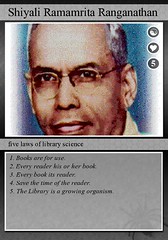 Jessamyn is quite the lover of Ranganathan, because he came up with some great laws for librarianship, and his rules really can be applied to so much of what librarians do outside of content. Jessamyn is a big believer that Ranganathan would love the interactive web, and would dig how his rules fit in. I'm a believer, myself. Caveat: Law 4 does state that you should "save the time of the reader," which often equals "user more librarian time for work," which may not work for some. When it comes to Library 2.0, whether it's educating librarians, or integrating tech into the library, or just making your physical space more usable, it's totally worth it.
Check out the presentation online, it's awesomely comprehensive, sensible, and educational (and loads wicked fast on low broadband). The only thing missing is The Excellent and Humorous Live Jessamyn Experience.
Technology can be a little crazy for librarians, especially in small libraries where maybe there's only dial-up access to the internet, or you only have one or two people who can help with tech 3 hours a week. However, you need not fear the Big Bad Technology. Technology isn't about knowing all the stuff, technology is really about knowing how to look up answers and try to figure it out. Look up your error messages on Google, sit down with a patron and figure out their webmail client (which you've, incidentally, never seen before), and don't be scared. It's like any other reference thing.
[Aside: For those of you who attended the session, or not, here's the link to the lolbrarians group she mentioned. Funny pictures of libraryish things in a community, like lolcatsy sites she mentioned.]
Jessamyn is quite the lover of Ranganathan, because he came up with some great laws for librarianship, and his rules really can be applied to so much of what librarians do outside of content. Jessamyn is a big believer that Ranganathan would love the interactive web, and would dig how his rules fit in. I'm a believer, myself. Caveat: Law 4 does state that you should "save the time of the reader," which often equals "user more librarian time for work," which may not work for some. When it comes to Library 2.0, whether it's educating librarians, or integrating tech into the library, or just making your physical space more usable, it's totally worth it.Check out the presentation online, it's awesomely comprehensive, sensible, and educational (and loads wicked fast on low broadband). The only thing missing is The Excellent and Humorous Live Jessamyn Experience.
Stephen Abram's Technoschism - Reflections
There will be more than enough posts about exactly what Stephen Abram said in his talk about technology, relevance, and how they meet (or don't currently meet) in libraries. So here are just my quick bullet points of reflection and contemplation.
- "What librarians do best is context management, not content management": As Stephen often reinforces in his talks, we're not competing with Google, that's an apples to oranges comparison (especially when they're way too busy creating apps and taking over the online world). Librarians need to focus on creating a context for content, an environment for user interaction (as a sidenote, remember that Library 2.0 includes *offline* environment). We shouldn't be trying to reinvent the wheel (or besmirching the evolution of newly-evolved information management methods) on how to manage stuff.
- Nexthead, not texthead: Are you ready for the next extinction of file formats? Do you know what you'll do when DVDs go the way of the dodo? Have you explored the ideas of preserving content by uploading it to file sharing servers, or using PodZinger and Podscope to get searchable transcripts of podcasts and videos, so you have some version of the content when it disappears?
- Focusing on stuff that doesn't suck: Like, say catalogs. Patrons don't want OPACs, they want user-centered design in their online environments. So we should focus on creating great environments (in my mind, this means either shirking bad OPACs and creating better ones with the help of vendors or via creative Greasemonkey scripting, or going out to services like LibraryThing and uploading our catalogs to be where our users are), and spend less time complaining about the shortcomings of an antiquated utility.
- Stop giving people information from a firehose: Stephen's talk took me back to my usability roots, with the reminder that we need to get better at user-centered design. No more showing patrons 300 ways to do something or 300 resources in a section, but more of really providing focused, customized information. This means getting to know our users, and not just sitting behind the desk and not making eye contact.
- Get social: Go where everyone is online, make an account, and play. My Caveat: Do not try to force a use of the social software stuff into the library if it doesn't fit; assess your needs, and figure out if a branch in Second Life or an account on Facebook is right for your library. But, the benefits of being in social software environments is understanding the culture, which equals understanding a section of your patrons.
- Do that 23 things thing: Not sure where to start? Go to 23 things. 15 minutes every other day can get you to a place where you'll start to get it.
Keynote Speakers Stress
Briefly reading the blogging efforts of my cohorts, I don't have much to add about the content of the speakers. What I do have, however, is added stress to my currently stressed-out persona! These thoughts are great--advocate! rebrand! connect!--I want to hit the ground running. I'm inspired, but the reality of having Windows 95 and broken (never to be replaced) computers is trumping ebooks and xml gadgetry. Don't get me wrong, I totally support the ideas behind Abrams slideshow, and advocate my head off at gatherings and in the media. I hope, though, that I can also come away from the conference with practical suggestions for these amazing inspirations.
Technoschism - Stephen Abram
Stephen starts: Google serves many more people that all librarians around the world. But can Google understand the excitement of a child during story hour? Google cannot replace librarians (even as hard as they try). Do we let these search engines control how we serve our community?
Some New Technologies
e-paper
light keyboards
projector the size of sugar cube- project computer screen on wall
i reader from Sony
e-book reader for $99 with reflected light
cell phones - Google phone and i-phone
Go XML - dominant personal devices - website needs to be seen on small screen too
Community - Are we misaligned with the end users?
Stephen offered a story-
Many children's librarians love their children but are not so sure about their mothers. They drop off their children and rush out of the children's room. Librarians are assuming that they are running out to smoke. But do we really know what they are doing? Maybe they are single parents trying to improve their lives? Maybe they are running upstairs to do research for a college paper that they are working on? The moral here is not to assume anything about your patrons. But to be prepared to meet you patrons where ever they need you to. In one library the librarians held a research class during story hour and had great attendance for both.
Paths on website - do we design our paths for our end users? Use graphics instead of words
"You can't make it too simple"
Understand and follow- JSR168 portlet and RSS - by doing this you ensure that your website fits on portable devices.
Google -250 million books - may soon rent books for nominal fees (This should scare librarians!)
"Get our heads out of the book"
Publishing and purchasing of books is up. Reading is up. We need to worry about our roles as librarians and not just defend the paper books.
How should we find our information? Google offers sponsor pages and are not concerned with our questions. Librarians are specialists and will be able to give information without it being skewed by sponsors. How do we let our patrons know that their searches are skewed?
Google Local - free wireless (entire cities & towns), find local businesses, find the best price of an item when walking through a mall.
However, when books are searched...no libraries appear!
Google is reaching out to students but not professors or librarians.
These big companies are trying to overtake our place in our communities. How are we going to handle this? How do we create an environment...how do we meet our user's needs?
"Libraries are about sharing' - social networking is also about sharing...let's make these connections.
What happens when DVD's die (or any other library inventory)? We need to be prepared for streaming...
Library 2.0 - be ready!
Get social-
Myspace - get involved! Bee where your patrons are!
Facebook - 95% of college students at U of Toronto have one.
Patrons can manage all your social groups through these networking sites. For life!
Second Life - a library here might receive 5000 visitors an evening.
Reorganize - virtual users are much different that physical patrons. Are we meeting their needs? We need to reach our future voters. IM-ing is how this new generation communicates.
Play - reinvigorate how we play. Set aside 15 minutes a day to play with these new sites. This gradual learning will introduce new technology in an non-frightening manner. Have your librarians take a library 2.0 class.
Increase your capacity to adapt!
I have to say this speech was very entertaining and very quick moving. This may not come across in this blog because sometimes I was so busy listening that it was hard to go back and describe what exactly had been said.
So to summarize: as librarians we must change, get to know the new technologies, meet our patrons where they are, we cannot sit back and just expect the patrons to come to us. There are many exciting directions that libraries are moving in...Let's Go!
Out Front With Stephen Abram: A Guide for Information Leaders - is Stephen's book if this blog sounded interesting to you.
Some New Technologies
e-paper
light keyboards
projector the size of sugar cube- project computer screen on wall
i reader from Sony
e-book reader for $99 with reflected light
cell phones - Google phone and i-phone
Go XML - dominant personal devices - website needs to be seen on small screen too
Community - Are we misaligned with the end users?
Stephen offered a story-
Many children's librarians love their children but are not so sure about their mothers. They drop off their children and rush out of the children's room. Librarians are assuming that they are running out to smoke. But do we really know what they are doing? Maybe they are single parents trying to improve their lives? Maybe they are running upstairs to do research for a college paper that they are working on? The moral here is not to assume anything about your patrons. But to be prepared to meet you patrons where ever they need you to. In one library the librarians held a research class during story hour and had great attendance for both.
Paths on website - do we design our paths for our end users? Use graphics instead of words
"You can't make it too simple"
Understand and follow- JSR168 portlet and RSS - by doing this you ensure that your website fits on portable devices.
Google -250 million books - may soon rent books for nominal fees (This should scare librarians!)
"Get our heads out of the book"
Publishing and purchasing of books is up. Reading is up. We need to worry about our roles as librarians and not just defend the paper books.
How should we find our information? Google offers sponsor pages and are not concerned with our questions. Librarians are specialists and will be able to give information without it being skewed by sponsors. How do we let our patrons know that their searches are skewed?
Google Local - free wireless (entire cities & towns), find local businesses, find the best price of an item when walking through a mall.
However, when books are searched...no libraries appear!
Google is reaching out to students but not professors or librarians.
These big companies are trying to overtake our place in our communities. How are we going to handle this? How do we create an environment...how do we meet our user's needs?
"Libraries are about sharing' - social networking is also about sharing...let's make these connections.
What happens when DVD's die (or any other library inventory)? We need to be prepared for streaming...
Library 2.0 - be ready!
Get social-
Myspace - get involved! Bee where your patrons are!
Facebook - 95% of college students at U of Toronto have one.
Patrons can manage all your social groups through these networking sites. For life!
Second Life - a library here might receive 5000 visitors an evening.
Reorganize - virtual users are much different that physical patrons. Are we meeting their needs? We need to reach our future voters. IM-ing is how this new generation communicates.
Play - reinvigorate how we play. Set aside 15 minutes a day to play with these new sites. This gradual learning will introduce new technology in an non-frightening manner. Have your librarians take a library 2.0 class.
Increase your capacity to adapt!
I have to say this speech was very entertaining and very quick moving. This may not come across in this blog because sometimes I was so busy listening that it was hard to go back and describe what exactly had been said.
So to summarize: as librarians we must change, get to know the new technologies, meet our patrons where they are, we cannot sit back and just expect the patrons to come to us. There are many exciting directions that libraries are moving in...Let's Go!
Out Front With Stephen Abram: A Guide for Information Leaders - is Stephen's book if this blog sounded interesting to you.
Keeping your Library and Your Library's Technology Sustainable
This session is being led by Linda Braun, an adjunct faculty member at Simmons GSLIS.
We are having a great discussion about 4 factors that are key to library sustainability--Participation and ownership, financial, technology, and external political and economic factors. Points brought up about participation and ownership in libraries included involving the entire community--staff, users, etc.--and making sure there are ways that everyone can participate. Librarians should seek input from users and let users know we want their input. Involve users in the planning process. Through marketing and outreach, libraries can let the community know what the library's mission is and how community involvement can keep the library sustainable.
Financial and technology factors are definitely tied together. Libraries need money to buy computers, but who is controlling your technology budget line (is it the library, the town, a board)? And technology is not the only financial crunch for libraries. Libraries need money to pay for staff, maintenance, utilities, and of course the collections. External political and economic factors in towns, states and even at the federal level impact the financial stability of public libraries.
Even though this session is focused on small and rural libraries, the discussion is applicable for academic, special and school libraries as well. One aspect of financial and technology sustainability that was brought up was simply the ability to keep up with new technologies. Most libraries have a website, but in order to remain sustainable we need to use social network sites and tools. I've worked in an academic library and now work in a special library and this topic of social network tools is a hot one in all types of libraries. Even though many tools are free, we need time to contribute to them well. And time means money in libraries.
Participants in this session have been asked to consider the factors that impact their library's sustainability. One factor that impacts my library's sustainability is simply keeping people coming in the door. Because I am a special librarian, I need to make sure that I order books and films that my users can't necessarily get at their public libraries. What factors impact your library's sustainability?
We are having a great discussion about 4 factors that are key to library sustainability--Participation and ownership, financial, technology, and external political and economic factors. Points brought up about participation and ownership in libraries included involving the entire community--staff, users, etc.--and making sure there are ways that everyone can participate. Librarians should seek input from users and let users know we want their input. Involve users in the planning process. Through marketing and outreach, libraries can let the community know what the library's mission is and how community involvement can keep the library sustainable.
Financial and technology factors are definitely tied together. Libraries need money to buy computers, but who is controlling your technology budget line (is it the library, the town, a board)? And technology is not the only financial crunch for libraries. Libraries need money to pay for staff, maintenance, utilities, and of course the collections. External political and economic factors in towns, states and even at the federal level impact the financial stability of public libraries.
Even though this session is focused on small and rural libraries, the discussion is applicable for academic, special and school libraries as well. One aspect of financial and technology sustainability that was brought up was simply the ability to keep up with new technologies. Most libraries have a website, but in order to remain sustainable we need to use social network sites and tools. I've worked in an academic library and now work in a special library and this topic of social network tools is a hot one in all types of libraries. Even though many tools are free, we need time to contribute to them well. And time means money in libraries.
Participants in this session have been asked to consider the factors that impact their library's sustainability. One factor that impacts my library's sustainability is simply keeping people coming in the door. Because I am a special librarian, I need to make sure that I order books and films that my users can't necessarily get at their public libraries. What factors impact your library's sustainability?
Subscribe to:
Posts (Atom)
